

Core Web Vitals are Google’s way of measuring how fast your WordPress site loads, how quickly it responds to visitors, and how stable the content is while loading. These factors matter because slow or jumpy sites frustrate users, and frustration leads to lost visitors and sales. Research shows that even a one-second delay on mobile can reduce conversions by about 20%.
Luckily, improving these metrics doesn’t require rebuilding your entire site. The foundation for better Core Web Vitals performance starts with quality hosting, like BigScoots, which makes sure your site has the speed and reliability needed to meet these benchmarks. Following that, there are some practical tweaks, configurations, and best practices that will make a big impact on your Core Web Vitals scores. Improving these metrics doesn’t require rebuilding your entire site.
With the right approach, you can assess your current performance and apply practical tweaks that make a real difference. By following this guide, you’ll learn how to boost your site speed, enhance the user experience, and potentially improve your search rankings – all while setting the stage for better overall performance.
Understanding Core Web Vitals: The key to better WordPress performance
Google’s research shows that sites meeting Core Web Vitals thresholds experience 24% fewer visitor abandonments, directly boosting conversion rates and revenue, critical for WordPress business sites.
Yet a 2022 study analyzing 3 million pages found only 39% of sites in Google’s top 20 search results actually pass Core Web Vitals assessments. This gap creates a real opportunity for WordPress site owners: even if your content is top-notch and worthy of ranking, poor Core Web Vitals scores could be holding you back. By optimizing these metrics, you increase your chances of ranking higher and attracting more visitors.
WordPress presents unique challenges for Core Web Vitals due to its architecture. Common issues like plugin conflicts, bloated themes, render-blocking scripts, and hosting limitations often cause performance hiccups. In particular, WordPress sites frequently struggle with Largest Contentful Paint (LCP) because of inefficient image handling and with Cumulative Layout Shift (CLS) due to dynamic content loading.
Core Web Vitals require meeting benchmarks on at least 75% of page views, making consistent performance across your entire WordPress site essential, not just one or two pages. Achieving this balance calls for targeted optimizations on both the front end (themes, plugins, images) and infrastructure level (hosting, caching).
Understanding the three main Core Web Vitals metrics helps you focus on improvements where they’ll have the most impact…
Breaking down the three Core Web Vitals metrics that impact rankings
Google measures Core Web Vitals using three main metrics that directly affect search rankings and user experience. Understanding these helps you identify exactly what needs improvement on your WordPress site:
- Largest Contentful Paint (LCP) measures how fast the main content loads, with a good score being under 2.5 seconds.
- Interaction to Next Paint (INP) tracks how quickly your site responds to user interactions, aiming for under 200 milliseconds. This replaced the older First Input Delay (FID) metric.
- Cumulative Layout Shift (CLS) measures visual stability by tracking unexpected page layout shifts, with a good score below 0.1.
Focusing on improving each of these metrics is how you deliver a faster, smoother, and more stable user experience.

LCP: Speeding up your main content loading
LCP measures how quickly the main content on a page becomes visible within a user’s screen. This could be a hero image, a banner, a video poster, or a large block of text. LCP is important because it signals when the page feels “ready” for visitors.
According to the W3C, LCP only measures elements visible in the viewport and stops tracking once the user starts interacting with the page. A slow LCP, generally considered as being over 2.5 seconds, leads to a poor first impression and makes users more likely to leave before engaging.
WordPress sites, especially those with heavy images or complex layouts, often struggle with LCP unless optimized carefully..
INP: Making your site responsive to user interactions
In 2024, Google updated this metric to INP, which now evaluates responsiveness across all user interactions on the page, not just the first one. A good INP score is under 200 milliseconds, the point where interactions feel instantaneous.
Slow responsiveness gives the impression of a sluggish or broken site, especially on mobile devices, where users expect immediate feedback. Think of it like a conversation: just as you get frustrated when someone takes too long to reply, visitors get equally annoyed when a website doesn’t react quickly to their actions.
CLS: Preventing annoying layout shifts
CLS measures how stable a page’s visual content remains as it loads by tracking unexpected layout shifts that happen while users are viewing it. These sudden movements can be distracting and frustrating, so you should aim for a score of 0.1 or below.
Common causes of poor CLS include images and videos without set dimensions, ads, or content loaded dynamically after the initial page render, web fonts triggering flashes of invisible text, and other elements appearing late due to network delays.
These layout shifts can cause users to misclick buttons or lose their place while reading, which harms the overall experience. WordPress sites often struggle with CLS because many themes and plugins inject dynamic content that shifts page layout unexpectedly.
How to check Core Web Vitals
Google’s Chrome User Experience Report (CrUX) provides real-world user data collected from millions of browsers worldwide.
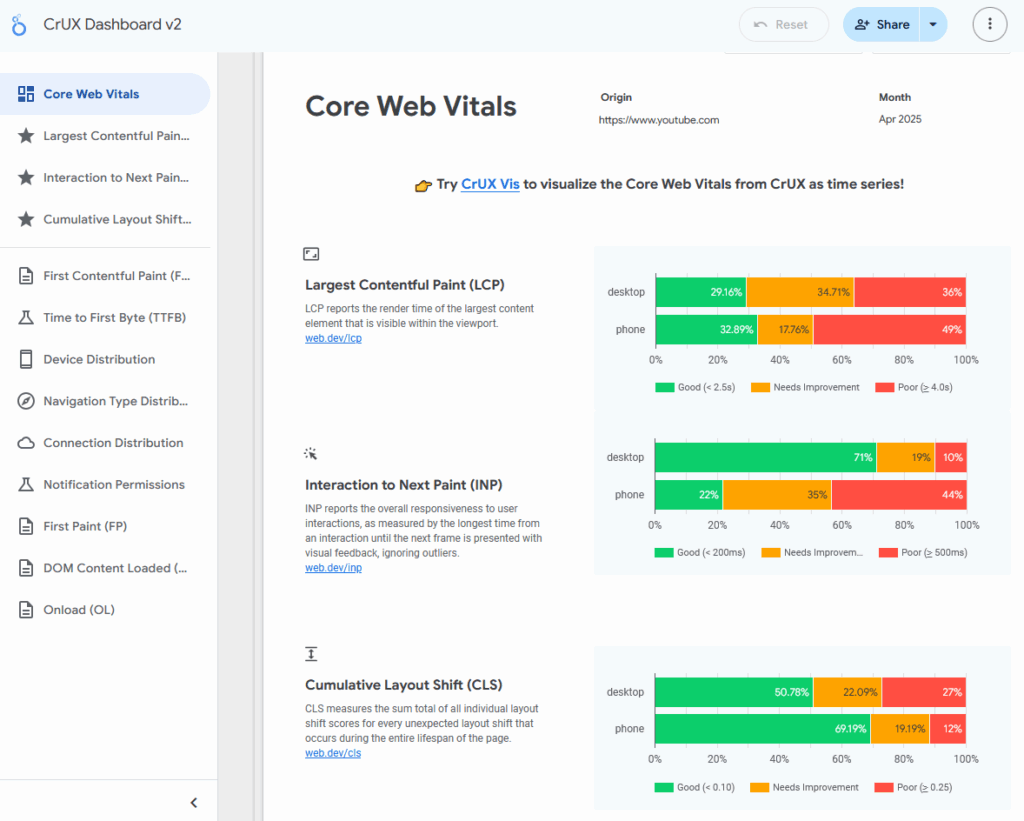
The CrUX Dashboard is a user-friendly tool that visualizes this data, showing how your site performs over time for both desktop and mobile users. Keep in mind, sites with low traffic might not have sufficient data available.
Here’s what you get when you use the CrUX Dashboard to look up YouTube.com’s Core Web Vitals scores:
CrUX Vis, a newer tool, offers detailed visualizations and deeper insights at both the origin and URL level, helping you identify which Core Web Vitals metrics are causing issues and where. Here’s the – frankly, troubling – CrUX Vis report for YouTube.com:

Google Search Console includes a dedicated Core Web Vitals report that’s one of the most accessible and widely used tools for monitoring performance. It tracks trends over time, flags problem URLs, and helps you prioritize fixes based on traffic and issue severity. It also includes the URL Inspection tool, which lets you verify whether Google has recognized your improvements.
| How to use Google Search Console to track Core Web VitalsOpen Google Search Console Go to Google Search Console and log in with your Google account. Choose the property (site) you want to check. Navigate to the Core Web Vitals report On the left-hand menu, click Experience → Core Web Vitals. You’ll see separate reports for mobile and desktop. Review performance summary Google classifies your pages into three categories: “Good,” “Needs improvement,” and “Poor.” You’ll see how many URLs fall into each category, along with a timeline showing trends. Click to view issue details Click into a specific issue (e.g., “LCP issue: longer than 2.5s”) to view affected URLs. This helps you prioritize the pages with the most traffic or impact. Use the URL Inspection tool to verify fixes After making improvements, paste the URL into the URL Inspection field at the top of the page. If Google has re-crawled it, you’ll see whether the issue is resolved. You can also click Validate Fix in the Core Web Vitals report to prompt Google to re-check the page. Give it time Because the report uses field data from real users, it can take up to 28 days for improvements to show. Check back regularly to track progress. 📌 Pro tip: Focus first on fixing issues affecting your most visited URLs. That’s where you’ll see the biggest impact fastest. |
Google recommends relying on these field data tools rather than one-off lab tests like PageSpeed Insights. Since Core Web Vitals are based on real user experiences, the data takes time to reflect any changes you make, usually around 28 days. Scores can also fluctuate with site updates, user behavior, and how the data is measured, so consistent monitoring is important for spotting trends and tracking improvements over time.
Proven WordPress optimization techniques to improve your Core Web Vitals scores
The right optimizations will improve your scores, enhance user experience, and boost your search rankings. Let’s look at the steps you can take to make the biggest difference for WordPress sites.
The most important step: upgrade your hosting
Your server’s response time (Time to First Byte or TTFB) sets a performance ceiling that no amount of on-page tweaks can surpass.
Google recommends keeping TTFB under 200 milliseconds for optimal Core Web Vitals.
Good hosting ensures consistent resource availability, preventing slowdowns and CPU throttling during traffic spikes, which benefits all Core Web Vitals by keeping your site fast, stable, and responsive under load.
BigScoots stands apart by owning its hardware, which gives us full control over resource allocation and allows us to provide ample performance headroom for all clients. Unlike many hosts who rent from third-party providers, at BigScoots, we own our infrastructure, ensuring that your site always has the resources it needs to perform at its best. This ownership enables us to allocate resources smartly, preventing the performance issues that arise when too many sites are crammed onto the same server.
This intelligent resource management plays a big role in your Core Web Vitals scores. A low Time to First Byte (TTFB), made possible by good hosting, helps improve all Core Web Vitals, because when your server responds quickly, the entire page loads faster and more smoothly. Hosting with plenty of available headroom also reduces the chances of slowdowns or layout shifts during peak usage, improving LCP, INP, and CLS across the board.
Our edge-first architecture, built on deep Cloudflare integration, caches content closer to users worldwide. This reduces Time to First Byte (TTFB), which in turn improves all Core Web Vitals by speeding up how quickly the site starts loading and responding for visitors.
Plus, our 24/7/365 expert team keeps a close eye on your site’s uptime and stability, with an average response time of around 90 seconds. If something goes wrong, we’re quick to jump in, often resolving issues before they affect your visitors.
Implement caching
Caching is super important, but the best caching happens at the hosting level, not through plugins that add extra code overhead. BigScoots caches content directly at the CDN edge via Cloudflare, delivering faster responses than typical server or network caching.
BigScoots offers a unique integration with Cloudflare that goes beyond the standard setup most hosts provide. By caching content right at the edge, we ensure that your visitors get lightning-fast page loads, with minimal latency and reduced server strain.
One case study even showed that enabling Cloudflare’s HTML caching cut page load times by 28%, reducing server response from 1.5 seconds to under 1 second.
What makes this even better is the BigScoots Cache Plugin. Unlike traditional caching plugins, ours acts more like a control panel for your hosting-level caching. For Cloudflare Enterprise users, it unlocks full control, and even base-level users get built-in performance benefits.
But here’s the standout feature: we’ve configured the plugin to automatically purge Cloudflare’s edge cache whenever you update a post, page, image, or anything else on your site. This means you never have to manually purge anything at Cloudflare – the edge cache is fully managed for you. Your visitors always see the most up-to-date version of your site, and you don’t need to lift a finger to keep things fast and accurate.
This deep, hands-free integration with Cloudflare is one of the biggest reasons BigScoots offers performance that other hosts simply can’t match.
Optimize images and media
Images often cause slow loading and layout shifts.
Use properly sized images with explicit width and height attributes to prevent visual instability (CLS).
Convert images to WebP format with fallbacks for older browsers, cutting file sizes by 25-35% compared to JPEG.
Lazy-load images below the fold to avoid loading everything at once, and preload images above the fold to improve perceived loading speed and Largest Contentful Paint (LCP).
For videos, use lightweight players, lazy load them, or host them externally to reduce server strain and improve load times.
🎯 Here’s a tip: Focus on the 80/20 rule of image optimization. Optimizing your largest contentful paint image and the top 20% of visible content can deliver 80% of the performance gains.
Limit plugin usage
Every active plugin adds JavaScript, CSS, and database queries – all of which can slow your site and hurt Core Web Vitals. Use only well-coded plugins that load assets only on pages where needed.
With hosting optimized like BigScoots’, many traditional performance plugins become redundant because their functionality is handled server-side.
🧩 This “plugin paradox” means that installing more plugins intended to speed up your site often makes things worse. Focus on minimal, functionality-specific plugins instead.
Opt for a lightweight theme
Heavy themes packed with features increase loading time and delay responsiveness. Choose block-based themes that use WordPress’s native architecture rather than third-party page builders.
Test themes with real-world performance tools, especially on mobile devices. Use child themes to customize them without the bloat of third-party or from-scratch solutions.
Minimize CSS and JavaScript
Defer and delay non-critical JavaScript and use async loading to speed up initial rendering. Employ code splitting to load only what’s necessary per page.
Use Chrome DevTools Coverage to find and remove unused CSS and JavaScript. Use inline critical CSS for above-the-fold content to optimize the rendering path.
Optimize webfonts
Webfonts can add personality, but they can also slow things down if not used wisely. Start by using font-display: swap to prevent invisible text flashes while fonts load. Self-host critical fonts to eliminate delays from third-party services, and preload the ones you need early using <link rel=”preload”>.
You should also consider web-safe fonts like Arial, Georgia, or Verdana – these are built into users’ devices and don’t need to be loaded at all, making them the fastest option available. You can find a list of these at W3Schools.
If you do use custom fonts, keep them lean:
- Reserve them for headings or key design elements.
- Use system font stacks for body text.
- Avoid loading unnecessary weights or styles.
🖊️ Treat typography like a performance budget. Every font comes at a cost, so pick what matters most and cut what you don’t need.
Optimize for mobile devices
Mobile-first indexing means your mobile performance drives Core Web Vitals scores. Simplify mobile layouts to reduce JavaScript execution and improve responsiveness.
Test on real devices or simulate using Chrome DevTools’ throttling functionality. Ensure touch targets are large enough (at least 48×48 pixels) and spaced well for easy interaction.
Let your host do it for you: BigScoots Performance Services for WordPress
While DIY optimizations can move the needle, many site owners find that real, lasting results come from letting performance experts take the reins. BigScoots’ Performance Services – an add-on for our Managed Hosting for WordPress plans – are designed to remove the technical guesswork and deliver meaningful improvements to your Core Web Vitals and your overall site experience.
We don’t just aim for high lab scores to make a test look pretty. Our team focuses on real-world improvements – the kind that actually matter to your visitors and your Google rankings. Unlike other services that try to “game the metrics,” we’re here to create long-term wins that translate into faster pages, better engagement, and higher conversions.
Here’s a peek at what we handle for you!
- Lazy loading and preloading of LCP images.
- Reducing unused JavaScript and CSS.
- Serving images in next-gen formats like WebP.
- Cutting initial server response time.
- And plenty more behind-the-scenes magic.
Our hands-on approach targets real performance blockers with long-term impact, not just quick fixes. Whether you’re running a high-traffic store, a dynamic blog, or a content-heavy site, these optimizations make sure your visitors get a fast, stable, frustration-free experience – every time they load your site.
Take your WordPress performance to the next level with BigScoots today
Improving Core Web Vitals comes down to addressing the fundamentals: quality hosting with fast server response times, proper image optimization, minimal plugin usage, lightweight themes, and mobile-first design. These optimizations work together to reduce loading times, improve responsiveness, and prevent layout shifts that frustrate users.
The most critical factor is your hosting foundation. BigScoots’ owned hardware infrastructure and deep Cloudflare integration provide the server performance and edge caching that make everything else possible. This gives you the foundation needed for excellent LCP and INP scores right out of the box.
For WordPress sites that need the absolute best Core Web Vitals performance, BigScoots’ Performance Services takes optimization further. This add-on service handles advanced techniques like LCP image preloading, unused code removal, and next-gen image formats – the granular optimizations that can push your scores from good to exceptional.
With 24/7/365 expert support and 90-second average response times, BigScoots ensures your site maintains peak performance whether you’re running on standard hosting or need the premium optimization services.
Ready to stop wrestling with complex performance tweaks? Explore BigScoots’ Managed Hosting for WordPress plans today.