

Going headless with WordPress lets developers build fully custom frontends tailored for speed, flexibility, and modern user experiences, while keeping the familiar WordPress editor your team already knows. This approach unlocks faster load times, easier scalability, and the freedom to use cutting-edge frameworks like React or Astro to create highly engaging websites that stand out.
While WordPress handles the backend content management, delivering that content quickly and reliably is critical because even the best frontend won’t perform well if the API is slow or unstable. That’s why we want to show you how to combine WordPress on BigScoots with Cloudflare Pages and Cloudflare Functions – modern tools that serve your frontend from the edge with blazing speed and smart serverless logic. Using the WP REST API, this setup ensures your content loads fast worldwide, keeps your architecture clean, and scales effortlessly.
What is a Headless CMS?
A Headless CMS is a content management system that only handles the backend – things like content creation, storage, and admin control. It delivers that content via API, leaving the frontend (the “head“) completely up to the developer.
Instead of the CMS managing both how content is stored and how it’s presented, a headless setup splits the two. You use the backend to manage content, and a separate frontend – built with your framework of choice – to display it. Here’s the split:
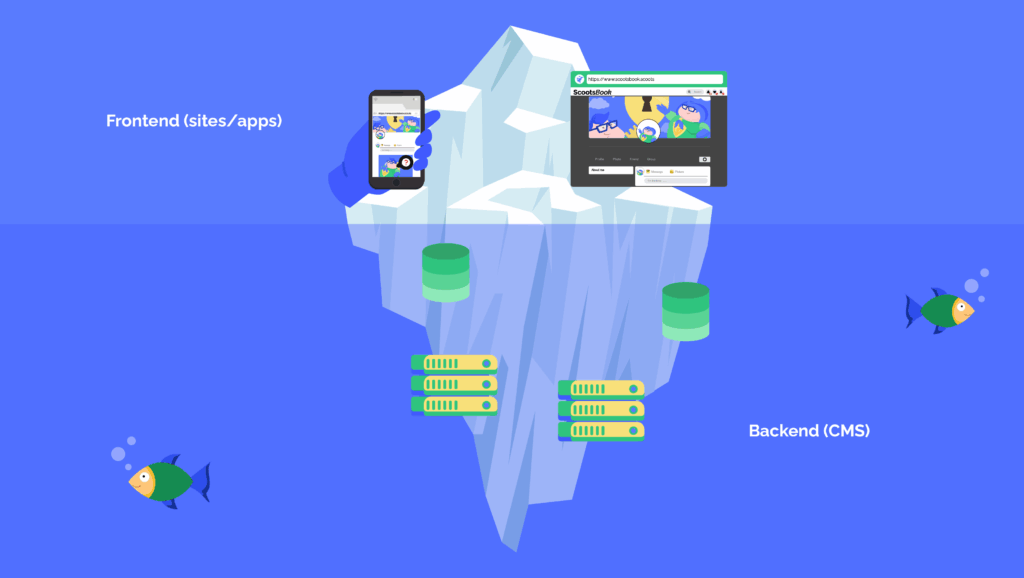
- Backend (CMS): Where editors log in, create posts, manage products, upload images, and organize content. In this case, WordPress.
- Frontend (Site or App): What your users see. This could be a website built in React, a mobile app, or even a smart display.
In traditional WordPress, the backend and frontend are closely connected – content is saved, rendered, and displayed using PHP templates and WordPress themes. In a headless WordPress setup, WordPress still stores and manages your content, but doesn’t generate the HTML for the frontend. Instead, it exposes your content via APIs like the WP REST API or GraphQL, which your custom frontend fetches and renders independently.
Headless vs. Decoupled
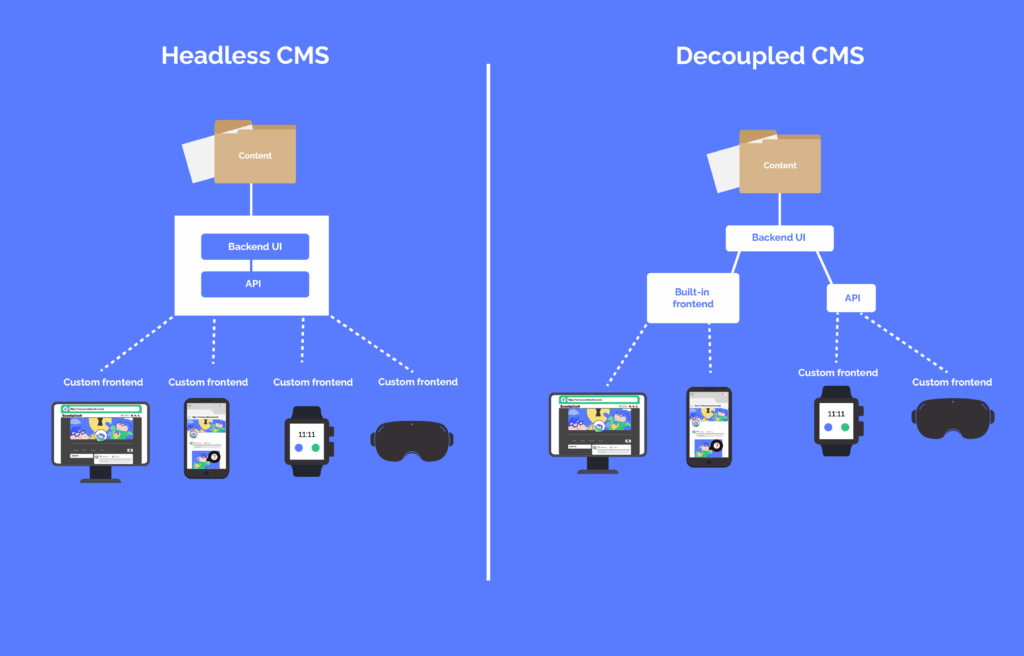
- Headless CMS: No frontend at all. It’s entirely disconnected – just an API.
- Decoupled CMS: Still provides APIs, but may include a basic frontend or templates you can use alongside your custom frontend. WordPress, for example, can be used both headlessly and in a decoupled setup.
So, if you’re building a fully custom React or Astro frontend and only want to use WordPress as the backend, you’re working headlessly. If you’re mixing in some traditional WordPress templates (like for admin previews or fallback pages), you’re more in decoupled territory.
Why use WordPress as a Headless CMS?
WordPress is usually seen as a traditional all-in-one CMS, but underneath, it’s surprisingly flexible. Thanks to the built-in WP REST API, WordPress works just as well as a backend-only content layer. You can publish content in the WordPress dashboard as usual and serve it to any frontend you want – websites, mobile apps, or even digital signage. But what makes WordPress a great headless backend?
- Familiar to editors and clients: You don’t have to retrain your content team. The backend stays the same – editors, marketers, and clients use the WordPress admin dashboard they already know.
- Full API coverage with WP REST API: WordPress exposes most content types (posts, pages, media, taxonomies, users) through a JSON-based REST API, making it easy to fetch content into any frontend using tools like fetch or Axios. However, some data, such as menus, aren’t exposed by default and may require plugins or custom endpoints. Custom fields are available if properly registered (for example, with show_in_rest => true), and popular plugins like Advanced Custom Fields (ACF) offer REST API integration to support this.
- Plugin compatibility: Plugins like ACF and WooCommerce also expose data through the API, so you can keep your editorial workflow intact while powering dynamic frontends.
- Framework freedom: Build with whatever frontend stack you like – React, Svelte, Astro, or anything else. You’re not locked into PHP templates or legacy code.
- Built for performance (especially when paired with edge-first caching): Serving your frontend from Cloudflare Pages puts your UI at the edge, reducing load times and latency around the world. Combined with BigScoots’ optimized WordPress hosting, your API stays fast and reliable, even under load.
- Strong developer ecosystem and extensibility: WordPress has a vast community and thousands of plugins and themes that can be adapted or extended for headless use cases, reducing development time and increasing flexibility.
- Built-in user and permissions management: WordPress handles user roles and permissions out of the box, which can be leveraged securely in headless setups for editorial workflows and access control.
⚠️ Things to watch out for
Headless setups are powerful, but they’re not zero-effort. Make sure you plan ahead for:
- No themes or templates: You’re building the entire frontend yourself, from routing to rendering. Great for flexibility – just be ready to roll up your sleeves!
- Not all plugins are API-ready: Some WordPress plugins don’t expose their data via the REST API. You may need to build custom endpoints or use hooks to surface what you need.
- Manual authentication and SEO configuration: Authentication and SEO logic must be implemented on the frontend or in edge functions. Plugins like Rank Math provide REST API support to help bridge SEO gaps.
- Consideration for real-time updates: Headless setups may require additional solutions (like Webhooks or polling) to keep the frontend in sync with content changes in WordPress.
- Security around API endpoints: By default, WordPress REST API read-only endpoints (like fetching public posts) are publicly accessible. However, exposing private or user-specific data requires authentication to keep it secure. For added protection, you can restrict or disable unused REST API endpoints using plugins or custom code to reduce your attack surface.
WordPress is often thought of as a traditional, monolithic CMS. But it actually makes an excellent headless CMS, thanks to its powerful and flexible WP REST API.
| Benefits of going Headless with WordPress | Things to keep in mind |
| Familiarity for editors and clients: Content teams can keep using the same WordPress dashboard they already know. | No themes or templates: You’ll need to build your entire frontend from scratch. |
| WP REST API: WordPress exposes content like posts, pages, taxonomies, and media via RESTful JSON endpoints. | Plugin limitations: Not all plugins expose data through the API – some may need custom endpoints. |
| Plugin support: Popular plugins like ACF and WooCommerce can also expose their data via the REST API. | Manual implementation work: Authentication, caching, and SEO need to be handled manually—unless you use an API-compatible SEO plugin like RankMath. |
| Framework freedom: You can use any frontend tech stack: React, Vue, Nuxt, Astro, and so on. | |
| Performance: Serve your frontend via platforms like Cloudflare Pages to make it fast, secure, and scalable. |
Live Demo & Open Source Project
To show you this setup in action, we’ve built a fully working demo:
🔗 Live Site: https://magic-headless-wp.pages.dev
💻 GitHub Repo: https://github.com/bigscoots/magic-headless-wp
You’re free to explore, fork, or repurpose this demo for your own project!
Set up WordPress and Cloudflare pages in 5 simple steps
Step 1: Set up WordPress on BigScoots
Start with a standard WordPress installation – just like you always would. We recommend enabling:
- Application Passwords.
- Pretty permalinks.
- Recommended plugins like:
- ACF (Advanced Custom Fields).
- WooCommerce (if using eCommerce).
- Any plugin that exposes custom post types.
Here are a couple of important documents in terms of connecting with WordPress and WooCommerce REST API:
🔗 WordPress REST API Authentication Docs
🔗 WooCommerce REST API Authentication Docs
BigScoots handles all the hosting configuration, backups, and server tuning for you, so you can focus on building.
Step 2: Access Your Data via the WP REST API
WordPress comes with a full-featured REST API out of the box.
Examples:
- Get all posts:
GET https://example.com/wp-json/wp/v2/posts - Get a single product:
GET https://example.com/wp-json/wc/v3/products/123
WordPress and WooCommerce both have full REST API support and detailed documentation:
To authenticate requests securely, use Application Passwords in Basic Auth format:
Authorization: Basic base64(username:application_password)
You can safely store these credentials as environment variables inside Cloudflare Pages.
Step 3: Build Your Frontend (Using Any Framework)
In our demo, we’ve used Vite + React, but the frontend is completely framework agnostic.
You could use:
- Next.js or Nuxt for SSR.
- Astro or Eleventy for static sites.
- Plain HTML and JavaScript.
- Any stack you like.
Cloudflare provides official build support for dozens of frameworks:
🔗 Cloudflare Pages Framework Guides
Example React fetch in the demo:
useEffect(() => {
fetch(‘/api/posts’)
.then((res) => res.json())
.then(setPosts);
}, []);
Note that /api/posts is handled by a Cloudflare Pages Function — not directly calling your WordPress site from the client-side.
Step 4: Use Cloudflare Pages Functions to Proxy API Calls
One of the most powerful parts of this setup is Cloudflare Pages Functions – serverless functions that run at the edge.
Instead of hitting your WordPress site directly from the browser (exposing API keys), you make calls like /api/posts, which are handled server-side via Pages Functions.
Here’s a real example from our demo:
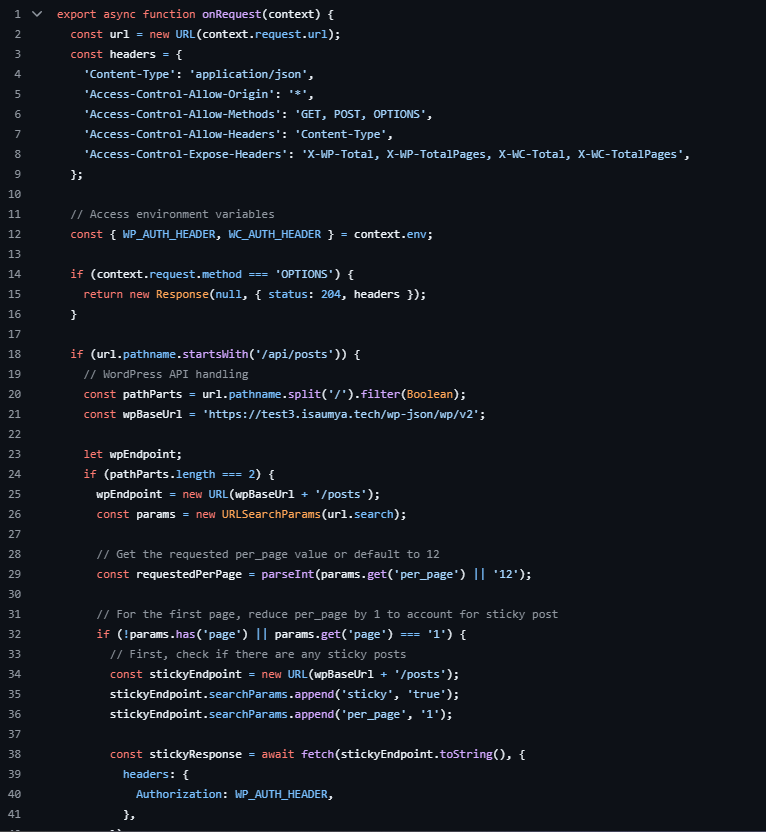
Take a look at our Cloudflare Pages code implementation to see how we are making calls to the WP REST API from the server-side, leveraging Cloudflare’s global CDN network to make every request run at a super-fast speed
You can define environment variables like WP_AUTH_HEADER and WC_AUTH_HEADER securely in your Cloudflare Pages project dashboard.
This gives you:
- Auth-protected requests.
- Clean API routes like /api/posts.
- Ability to cache, transform, or validate data at the edge.
Step 5: Deploy Your Frontend with Cloudflare Pages
To go live:
- Push your frontend code to GitHub.
- Create a new Cloudflare Pages project.
- Connect your GitHub repo.
- Set build command (e.g., npm run build).
- Set output folder (e.g,. dist).
- Add environment variables:
- WP_AUTH_HEADER
- WC_AUTH_HEADER
- Deploy!
Cloudflare has a detailed guide for almost all front-end systems to be deployed on Cloudflare Pages.
Now your frontend is hosted on the edge, powered by WordPress behind the scenes.
💡 Advanced Enhancements (Optional)
Once you’re up and running, here are a few ways to level up your build:
- Use Cloudflare Cache API to cache frequently requested API responses.
- Store user sessions or feature toggles using Cloudflare KV.
- Add redirects, SEO headers, or access control logic in Pages Functions.
- Use stale-while-revalidate caching strategies for dynamic content.
Speedy overview of the architecture
Let’s break down the tech stack we’re using:
| Layer | Technology |
| CMS Backend | WordPress + WooCommerce (hosted on BigScoots) |
| Data API | WP REST API (and WooCommerce REST API) |
| Frontend | React (via Vite) |
| Hosting | Cloudflare Pages |
| Edge Logic/API | Cloudflare Pages Functions |
Partner with BigScoots for Headless WordPress Hosting
Building a headless WordPress site demands a backend that can deliver content quickly, reliably, and securely through the REST API. If your hosting isn’t optimized for fast API responses, strong security, and smooth scaling, even the best frontend frameworks will struggle to perform at their best.
Good hosting provides:
- Fast, consistent REST API performance so your frontend loads without delays.
- Robust security and automatic backups to keep your content safe.
- Scalability without throttling to handle sudden traffic spikes.
- Expert, human-powered support familiar with headless workflows for quick troubleshooting.
BigScoots is built exactly with these needs in mind. Our infrastructure is tailored for WordPress and WooCommerce, focusing on REST API speed, reliability, and security. Beyond that, our support team is made up of real WordPress experts – not bots or confusing tiered systems – ready to help when you need it.
We don’t just support headless architectures – we’ve even built this demo website to show what’s possible when you host your WordPress backend with BigScoots. With the right hosting foundation, you can deliver fast, flexible, and secure headless sites that scale smoothly with your goals.