

Running a successful website often means celebrating spikes in traffic – whether it’s from a viral blog post, a major marketing campaign, or a seasonal sale. But when that surge in visitors causes your site to crash… that’s not exactly something to sing and dance about.
Website downtime during these moments results in lost revenue and can also damage your reputation with users. Even the largest sites can collapse following a surge of unexpected traffic, making this a very real concern for businesses of all sizes.
The good news is that with the right hosting infrastructure, proactive optimization strategies, and monitoring tools, you can prevent these crashes from happening.
And we’re here to help!
We’ll walk you through the common causes of website crashes, how to anticipate traffic spikes, and the best strategies to prevent your website from going down.
From optimizing server resources to leveraging powerful content delivery networks (CDNs), you’ll learn the steps that will protect both your revenue and your brand’s reputation.
Common causes of traffic-induced website failures
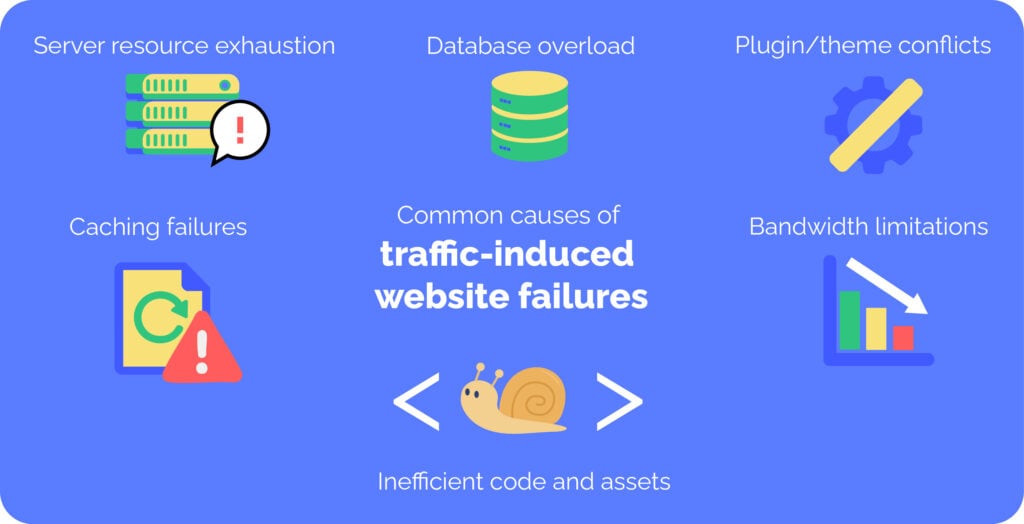
Websites can crash during high traffic spikes for several reasons, most of which are related to server resource limitations. The top six causes are:
- Server resource exhaustion
Servers are built with finite resources like CPU, RAM, and network connections. When traffic spikes, these resources can quickly be overwhelmed. Shared hosting environments, where multiple websites share the same server, are particularly vulnerable to this problem. If one site experiences a sudden surge in traffic, it can cause the entire server to slow down or crash. However, even on VPS (Virtual Private Servers), which allocate a specific portion of server resources to each customer, the server can still face overloads if too many VPS instances are hosted on the same physical machine. - Database overload
Websites rely heavily on databases to store and retrieve content. However, when too many simultaneous queries flood the database, it can struggle to keep up, leading to timeouts and potential crashes. This is particularly true for WordPress sites where dynamic content generation is database-intensive. In such cases, a slow database can severely impact the performance of your entire website. - Bandwidth limitations
Every hosting plan comes with an allocated amount of bandwidth, which limits how much data your website can transfer in a given period. During a traffic spike, this bandwidth can quickly be used up, causing slow loading times or even a complete shutdown of your site. Bandwidth throttling can result in delayed responses for users trying to access your site, or worse, it can cause visitors to receive error pages. - Inefficient code and assets
Poorly optimized website code and other assets can also contribute to crashes during high-traffic events. Bloated JavaScript, heavy images, and uncompressed files increase the strain on your server, making it harder for the server to deliver content quickly. Inefficient code magnifies resource usage, causing your server to become overwhelmed much more quickly than with streamlined, optimized code. - Plugin/theme conflicts
WordPress websites often rely on plugins and themes to add functionality and style. However, some plugins or themes aren’t designed to handle large traffic loads and can create bottlenecks. These bottlenecks can cause delays in processing requests, slowing down the entire website or even causing it to crash. Conflicts between plugins or with the theme’s code can exacerbate the issue during high-traffic periods. - Caching failures
Caching systems handle increased traffic by temporarily storing copies of static content like images, CSS, and HTML files. However, when they’re misconfigured or fail to update properly, they can’t effectively serve cached content, placing additional load on the server. A misconfigured cache can cause high traffic to continuously request fresh data from the server, further overwhelming it and potentially causing downtime.
High-risk scenarios: When to expect traffic surges

Certain events and circumstances can make your website more vulnerable to traffic spikes. Understanding these scenarios can help you prepare and minimize the risk of crashes.
Planned marketing events
Email campaigns, product launches, and flash sales are prime opportunities for driving traffic, but they also come with the risk of overwhelming your site. With a well-coordinated campaign, visitors flock to your site all at once, making it crucial to ensure your hosting infrastructure can handle the surge.
Seasonal traffic surges
Seasonal promotions like Black Friday and Cyber Monday are known for their massive online traffic spikes. Retailers and eCommerce businesses, in particular, face a significant uptick in site visits, and without the right infrastructure in place, these surges can quickly lead to crashes.
Media exposure
Being featured on popular news sites, TV shows, or even going viral on social media can result in a sudden increase in visitors. While media exposure is great for brand visibility, it often leads to an unexpected spike in traffic that many websites aren’t prepared to handle.
Unexpected viral content
Viral content on platforms like Reddit or TikTok can send waves of traffic to your site within hours. A single post gaining traction can generate a flood of visitors, potentially causing your server to buckle under the load if you aren’t equipped to handle it.
Competitor downtime
When a competitor’s site crashes, there’s a chance that some of their traffic will redirect to your site. If your competitor’s infrastructure fails to handle high traffic, your website could see a sudden increase in visitors, so it’s important to be prepared for these shifts.
Industry announcements
Major announcements or events in your industry can drive significant traffic to your site. Whether it’s a new product, regulation changes, or an important partnership, these events often trigger an influx of curious visitors eager for the latest information.
Geographic factors
Sometimes, traffic spikes are driven by regional events or time-zone-based patterns. For example, if you’re hosting a live event or releasing content timed to a specific region, visitors from that area may cause a surge in local traffic that needs to be managed accordingly.
Real-life examples of high-traffic website failures
Website crashes due to traffic surges have affected some of the biggest names across various industries. Here are a few high-profile examples:
eCommerce
Target’s website crashed during a collaboration with a designer brand is one of the most infamous eCommerce failures. The surge in traffic overwhelmed the site as customers rushed to purchase exclusive items, causing slowdowns, error messages, and a complete crash, preventing many from making purchases during the launch.
Similarly, Ticketmaster faced a massive website failure due to an overwhelming demand for Taylor Swift concert tickets. This resulted in long delays and system failures, frustrating fans and leading to widespread backlash.
Government websites
The rollout of Healthcare.gov in 2013 is a textbook example of a government website failing under the weight of high traffic.
Millions of Americans flocked to the site to sign up for health insurance under the Affordable Care Act, but technical issues caused severe slowdowns and crashes.
Similarly, tax filing websites often crash or experience delays on the last day before tax deadlines as millions of users try to file their returns simultaneously.
Media streaming
During high-profile events, media streaming platforms are also vulnerable to traffic surges.
HBO Max experienced a crash during the Game of Thrones finale, as millions of fans tried to watch the highly anticipated episode, overwhelming the platform.
Disney+ also faced major issues on its launch day, with users experiencing long waits and error messages as the system struggled to handle the sudden influx of new subscribers.
These failures demonstrate that even large, well-established websites can buckle under the weight of high traffic, making it clear that proactive infrastructure planning is crucial.
Essential prevention strategies to handle traffic spikes
Preventing website crashes due to high traffic is always more cost-effective than recovering from them.
By adopting a proactive approach, you can ensure that your site remains stable and performant even during peak traffic periods.
These strategies work best when implemented together as part of a comprehensive plan, addressing everything from infrastructure to site optimization.
While some solutions require technical expertise, many can be handled by choosing the right hosting partner who understands your needs and can help you scale effectively.
Let’s dive into the best practices that will help safeguard your website from crashes and downtime.
Scale your website confidently with proven hosting infrastructure
Scalable infrastructure allows you to efficiently manage sudden spikes in visitors without compromising performance. Scalability ensures that resources such as CPU, RAM, and bandwidth are available when needed, allowing your site to expand smoothly without sudden crashes.
One of the biggest limitations of shared hosting during high-traffic events is the lack of dedicated resources. In shared hosting environments, multiple websites are hosted on the same server, which means that if one site experiences a spike, all other sites can be affected.
Even with VPS hosting, if too many virtual instances are on the same server, resource exhaustion can lead to performance degradation.
Thankfully, we created something perfect for this very moment…
At BigScoots, we own our infrastructure, giving us full control over resource allocation. This means there’s no need to rely on third-party providers or deal with arbitrary resource limitations.
BigScoots intentionally provides a generous buffer to make sure there’s always extra headroom, even during traffic spikes. With BigScoots’ managed hosting for WordPress plans, your site can comfortably handle anywhere from 250K to 1.5M monthly visitors, all while maintaining optimal performance!
Backed by a 99.99% uptime guarantee, our infrastructure prevents server overloading and keeps your site running smoothly.
A great example is My Chic Obsession, who switched to BigScoots to eliminate downtime issues caused by insufficient resource allocation with their previous host. BigScoots’ proactive infrastructure management ensured a transition, with no downtime and significantly faster load times post-migration.
Integrate with a CDN
A CDN is a network of servers strategically placed in multiple locations around the world. These servers store cached content, such as images, videos, CSS files, and JavaScript, and deliver it to users from the server closest to them. This significantly speeds up website performance and reduces the strain on your origin server.
CDNs help manage traffic spikes by distributing website traffic across multiple servers, ensuring no single server is overwhelmed. This reduces latency for global visitors, as content is served from a server closer to their location.
CDNs also provide protection against DDoS attacks by distributing traffic loads, preventing a concentrated attack on any single server.
Additionally, they decrease bandwidth usage on your origin server by offloading static content delivery to the CDN, freeing up resources for dynamic content.
BigScoots’ infrastructure is built on a unique Cloudflare integration, with a direct fiber connection to Cloudflare’s Chicago data center (350 E. Cermak). This gives BigScoots’ customers privileged network access, ensuring faster delivery and stronger security.
💡 All BigScoots Managed Hosting for WordPress plans come with a base-level Cloudflare account, while larger Enterprise Hosting for WordPress plans, Mediavine Hosting plans, and Performance and Security package customers get access to Cloudflare Enterprise.
CDNs also use caching to store frequently requested content, further reducing server load by serving cached versions of static files rather than generating them each time.
Proper CDN implementation requires expertise, which is exactly what BigScoots provides to ensure optimal setup and performance for your site.
Monitoring and testing: Identify vulnerabilities before they cause crashes
Continuous monitoring allows you to detect potential issues before they escalate. By keeping an eye on key metrics, you can spot performance bottlenecks and address them promptly, ensuring your website remains stable during high-traffic events.
Key metrics to monitor include:
- Server response time: Measures how quickly the server responds to requests. Slow response times can lead to website downtime.
- CPU and memory usage: High usage indicates potential overload, which can crash the site.
- Database performance: Slow database queries can result in timeouts, affecting overall site performance.
- Error rates: Tracking errors helps identify faulty code or server issues.
- Traffic patterns: Understanding normal and spike traffic helps in anticipating high-traffic periods.
Automated alerts can provide early warning of potential issues, allowing for immediate action.
Establishing performance baselines helps you recognize abnormal behavior, like unexpected slowdowns or errors, before they lead to crashes.
BigScoots integrates Patchstack, a powerful tool for identifying and addressing vulnerabilities in WordPress sites, as part of our managed hosting service.
Our 24/7/365 management team ensures constant monitoring and quick action, with support tickets typically addressed in under 90 seconds. With our proactive expertise, BigScoots can identify problems that site owners may miss, preventing issues before they escalate.
Run load testing
Load testing involves deliberately putting stress on your website to assess how it performs under normal high-traffic conditions. It helps identify potential weaknesses in your infrastructure before they lead to real-world problems. Stress testing, on the other hand, takes things further by pushing the website beyond its normal capacity to see how it handles extreme conditions.
Load testing should be performed:
- Before major launches or promotions: Ensuring your site can handle the expected surge in traffic is vital to prevent crashes during key events.
- After significant site changes: If you’ve made updates or added new features, load testing ensures everything functions smoothly under stress.
- Periodically, as part of regular maintenance: Ongoing testing helps catch issues early, ensuring your site can handle traffic surges as it grows.
Popular load testing tools include:
- Apache JMeter: A widely used open-source tool for testing web applications.
- LoadImpact: A cloud-based testing service that simulates traffic from different locations.
- Gatling: A performance testing tool that focuses on simulating real user behavior.
During load testing, key metrics to monitor include:
- Response time degradation: How long it takes for your site to respond under load.
- Error rates: A spike in errors can indicate server overload.
- Server resource utilization: Keep track of CPU, memory, and bandwidth usage.
- Breaking points: Identify when the server can no longer handle the load.
The results from load tests should be used to make necessary infrastructure improvements, such as upgrading resources or optimizing code to prevent slowdowns.
At BigScoots, we offer expert guidance on load testing for clients preparing for high-traffic events, helping ensure your site remains stable when it matters most.
🏋️ Think of load testing like strength training: you stress your website in a controlled environment so it’s ready for real-world challenges. Without this “website workout,” your site may struggle when faced with unexpected demands.
Have HTTPS forced on the site
HTTPS is a more secure version of HTTP, which encrypts the data exchanged between your website’s server and its visitors’ browsers.
This encryption relies on SSL certificates, which ensure that sensitive information, like passwords or payment details, remains private and protected from hackers.
Beyond its security benefits, HTTPS offers several advantages for handling traffic spikes:
- Enables HTTP/2 protocol: HTTP/2 improves connection efficiency by allowing multiple requests to be sent simultaneously over a single connection, speeding up load times and reducing server load.
- Reduces vulnerability to attacks: HTTPS helps protect against certain types of attacks, like man-in-the-middle attacks, which can cause downtime or crashes.
- Improves browser connection management: HTTPS reduces latency and ensures faster connections, which is crucial during high-traffic events.
- Better CDN integration: HTTPS is required for proper CDN integration, allowing for faster content delivery and load balancing during traffic surges.
Forcing HTTPS means automatically redirecting all HTTP requests to HTTPS. This process prevents visitors from accessing unsecured versions of your site and ensures all traffic is encrypted.
For traffic management, forcing HTTPS helps avoid duplicate connections, streamlines server resources, and improves performance.
Search engines, like Google, also favor HTTPS sites, which can improve your rankings and drive more traffic to your site.
BigScoots handles SSL certificate installation and renewal for all clients, ensuring secure connections without requiring technical expertise. We also configure proper HTTPS redirects as part of our service, giving you peace of mind and enhanced site security.
Prepare your website for success with BigScoots
Website crashes during high-traffic events are often caused by server overload, insufficient resources, and a lack of scalability.
Proper preparation is essential to avoid these issues, but it also presents an opportunity to gain a competitive edge. When your competitors’ websites go down, yours stays online, capturing their traffic and maintaining customer trust.
BigScoots offers tiered visitor capacity plans that are designed to meet the specific traffic needs of your business, supporting up to 1.5 million monthly visitors without breaking a sweat.
Our 99.99% uptime guarantee ensures your site stays online even during surges, year after year. We also include CDN with all plans to distribute traffic efficiently, reducing server load during high-traffic periods.
With 24/7/365 support, our expert team monitors your site around the clock, proactively addressing issues before they escalate.
Unlike other providers, BigScoots doesn’t punish clients who exceed their resource allocations – we allow flexibility and time to adjust, ensuring your site continues to perform optimally.
Plus, our 45-day money-back guarantee lets you test BigScoots’ infrastructure risk-free during high-traffic events.
Learn more about BigScoots’ Managed Hosting for WordPress plans today!